Build your first MCP App: an interactive task board that lives inside Claude
Claude can call your tools. What it could not do — until MCP Apps — was show your user an interface instead of a paragraph. This tutorial builds one from scratch: a task board that lives inside Claude, with checkboxes that work, a form that adds tasks, and a button that asks Claude to summarize the board — every step verified against the real server and the real View.
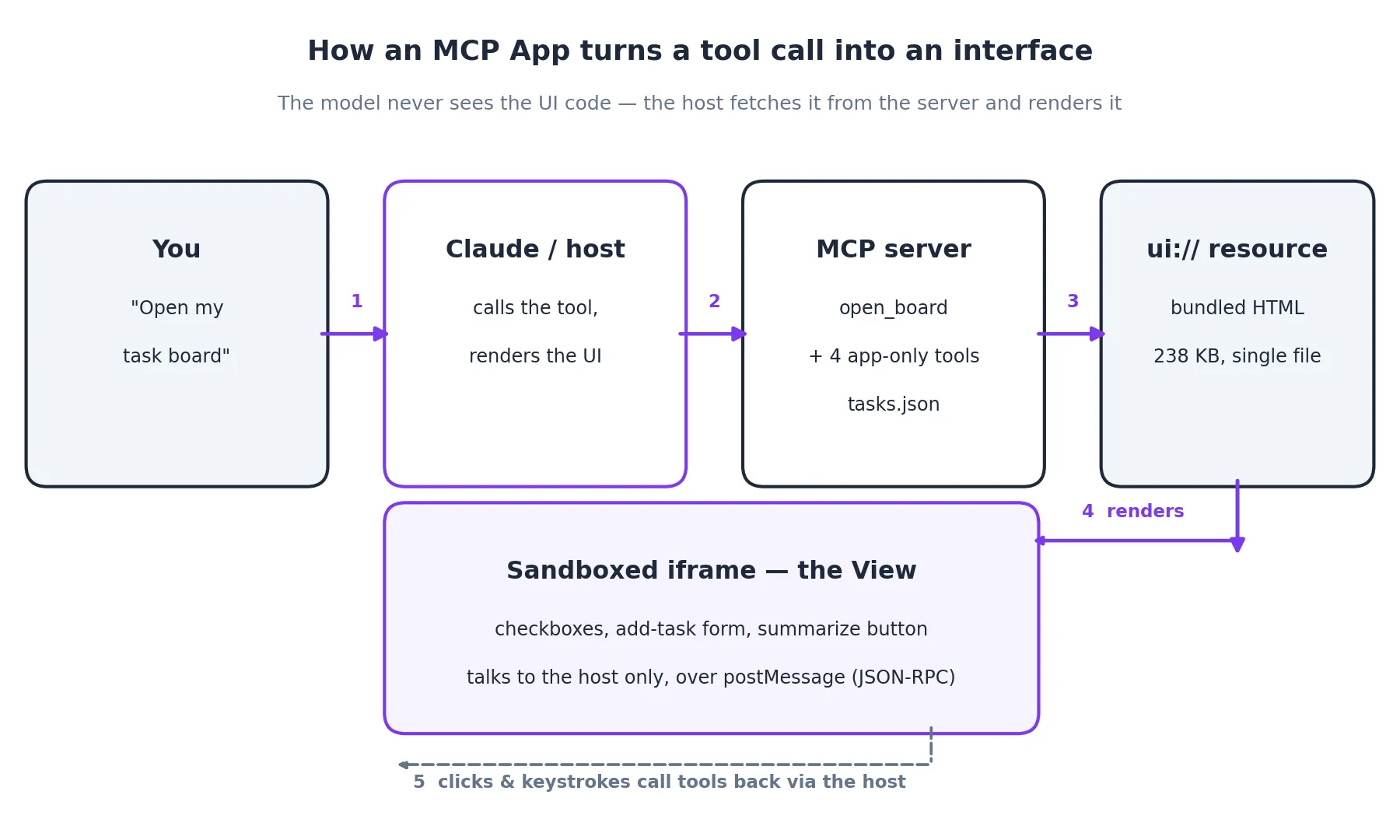
ui:// resource, the host renders it in a sandboxed iframe, and the View calls tools back through the host. You build a task board with five tools — one the model sees, four only the UI can call — bundle the View into a single 239 KB HTML file, verify the whole contract with a real MCP client, and run it in Claude Desktop.- The pattern in one sentence: a tool declares
_meta.ui.resourceUripointing at aui://resource with MIME typetext/html;profile=mcp-app; the host fetches it and renders it. - Two registrations do all the work:
registerAppToolfor the tool,registerAppResourcefor the HTML. The SDK is@modelcontextprotocol/ext-apps2.0.4; Node 20+ required. - Visibility is the access control:
visibility: ["app"]hides a tool from the model so only the View can call it — the four plumbing tools in this tutorial use it. - The View never talks to your server directly. Every call is relayed by the host over
postMessageJSON-RPC, and the host applies a strict CSP by default. - Verified end to end: 18 protocol checks against the real server over stdio, an HTTP initialize handshake, and 15 View checks in a fake host — all passing.
Claude can already call your MCP tools. What it could not do — until MCP Apps — was show your user an interface instead of a paragraph. Ask for a chart and you got a description of a chart. Ask to review a list and you got the list as text, which you then had to re-type to change.
That gap closed in two steps. On January 26, 2026, MCP Apps became the first official extension to the Model Context Protocol: a standard way for a server to ship an interactive HTML interface with a tool, rendered in a sandboxed iframe inside the chat. On November 10, 2026, Anthropic went further, announcing full apps that open beside the conversation in Claude — with Claude able to operate the app itself. This tutorial builds one from scratch: a task board that lives inside Claude, with checkboxes that work, a form that adds tasks, and a button that asks Claude to summarize the board. Every line of it is verified — the server, the View, and the handshake between them all run in this tutorial’s test suite, and the outputs below are the real ones.
What you’ll need#
- Node.js 20 or newer (this tutorial used 24.22.1) and npm. No other runtime, no Docker, no GPU.
- A code editor and a terminal. Two terminal windows help in the final steps: one for the server, one for the tests.
- A host to see it in. Claude Desktop, VS Code with MCP support, or the reference basic-host that ships with the ext-apps repo. The build itself needs no account and no API key.
- Basic TypeScript. If you have built an MCP server before, this is a short step. If you have not, every piece is explained as it appears.
- Cost: $0. Time: about 45 minutes.
The finished project is a folder called task-board-app with nine files: a server, an entry point, a View, three config files, and two test scripts. The server exposes five tools. One of them, open_board, is the tool the model sees. The other four — get_tasks, add_task, toggle_task, delete_task — are plumbing for the UI, hidden from the model entirely. Tasks persist in a tasks.json file, so the board survives restarts.
1. Scaffold the project#
Create the folder and install the dependencies from the official quickstart. The ext-apps SDK is the only new piece; the rest are the standard MCP TypeScript packages, zod for schemas, and Express for the HTTP transport.
mkdir task-board-app && cd task-board-app
npm init -y
npm install @modelcontextprotocol/ext-apps @modelcontextprotocol/client@^2.0.0 @modelcontextprotocol/server@^2.0.0 @modelcontextprotocol/node@^2.0.0 @modelcontextprotocol/express@^2.0.0 zod@^4.2.0 express cors
npm install -D typescript vite vite-plugin-singlefile @types/express @types/cors @types/node tsx concurrently cross-env
npm pkg set type=module
npm pkg set scripts.build="tsc --noEmit && tsc -p tsconfig.server.build.json && cross-env INPUT=mcp-app.html vite build"
npm pkg set scripts.start='concurrently --raw "cross-env NODE_ENV=development INPUT=mcp-app.html vite build --watch" "tsx watch main.ts"'
Two scripts do the work. npm start is the development loop: Vite rebuilds the View on every save while tsx restarts the server. npm run build typechecks everything, compiles the server to plain JavaScript in dist/, and bundles the View into a single HTML file. The versions this tutorial verified with:
| Package | Verified version | Role |
|---|---|---|
@modelcontextprotocol/ext-apps | 2.0.4 | MCP Apps SDK (App class, registerAppTool, registerAppResource) |
@modelcontextprotocol/server | 2.4.0 | McpServer |
@modelcontextprotocol/client | 2.4.0 | Used by the verification script |
@modelcontextprotocol/node / express | 2.1.2 / 2.0.2 | Streamable HTTP transport |
zod | 4.6.7 | Tool input schemas |
typescript / vite | 7.0.2 / 8.4.0 | Typecheck and bundling |
vite-plugin-singlefile | 2.3.4 | Inlines the View into one HTML file |
Now the three config files. The root tsconfig.json typechecks the whole project; tsconfig.server.build.json compiles the server to JavaScript; vite.config.ts bundles the View. All three are adapted from the official quickstart, with one deliberate change: the quickstart’s server tsconfig emits declarations only, which is fine when you run the server with tsx in development — but this tutorial also compiles a plain dist/main.js so Claude Desktop can run the server with stock Node.
{
  "compilerOptions": {
    "types": ["node", "vite/client"],
    "target": "ESNext", "lib": ["ESNext", "DOM", "DOM.Iterable"],
    "module": "ESNext", "moduleResolution": "bundler",
    "allowImportingTsExtensions": true, "resolveJsonModule": true,
    "isolatedModules": true, "verbatimModuleSyntax": true,
    "noEmit": true, "strict": true, "skipLibCheck": true,
    "noUnusedLocals": true, "noUnusedParameters": true,
    "noFallthroughCasesInSwitch": true
  },
  "include": ["src", "server.ts", "main.ts"]
}
{
"compilerOptions": {
"types": ["node"],
"target": "ES2022", "lib": ["ES2022"],
"module": "NodeNext", "moduleResolution": "NodeNext",
"declaration": false, "emitDeclarationOnly": false,
"outDir": "./dist", "rootDir": ".",
"strict": true, "esModuleInterop": true, "skipLibCheck": true,
"noUnusedLocals": true, "noUnusedParameters": true,
"noFallthroughCasesInSwitch": true
},
"include": ["server.ts", "main.ts"]
}import { createLogger, defineConfig } from "vite";
import { viteSingleFile } from "vite-plugin-singlefile";
const INPUT = process.env.INPUT;
if (!INPUT) {
throw new Error("INPUT environment variable is not set");
}
const isDevelopment = process.env.NODE_ENV === "development";
const prefixedLogger = createLogger();
for (const level of ["info", "warn", "error"] as const) {
const fn = prefixedLogger[level];
prefixedLogger[level] = (msg, opts) => fn(msg.replace(/^/mg, "[vite] "), opts);
}
export default defineConfig({
customLogger: prefixedLogger,
plugins: [viteSingleFile()],
build: {
sourcemap: isDevelopment ? "inline" : undefined,
cssMinify: !isDevelopment,
minify: !isDevelopment,
rollupOptions: { input: INPUT },
outDir: "dist",
emptyOutDir: false,
},
});2. Register the tool and the UI resource#
This is the whole pattern: a tool plus a UI resource, tied together by one URI. The tool’s _meta.ui.resourceUri names a resource under the ui:// scheme; that resource serves an HTML page with the MIME type text/html;profile=mcp-app. When a host calls the tool, it reads the resource and renders the page in a sandboxed iframe. The rest of the file is a small task store in tasks.json and four plumbing tools the View calls.
Three details deserve attention before you read the code. First, visibility: every tool defaults to visible to both the model and the app. Setting visibility: ["app"] hides a tool from the model, so only the View on this server connection can call it — that is how the four plumbing tools stay out of the model’s tool list. Second, every tool returns the board twice: human-readable text for the chat transcript, and structuredContent carrying the task list for the View. The app-only tools also put the same payload in their text as JSON, so the View can always read the new state even on a host that does not forward structuredContent to the View. Third, state lives in a file, not in memory: in HTTP mode the server factory runs once per request, and a View reload restarts from the HTML, so anything that must survive either belongs on disk.
import {
  registerAppResource,
  registerAppTool,
  RESOURCE_MIME_TYPE,
} from "@modelcontextprotocol/ext-apps/server";
import { McpServer } from "@modelcontextprotocol/server";
import { randomUUID } from "node:crypto";
import fs from "node:fs/promises";
import fsSync from "node:fs";
import path from "node:path";
import { fileURLToPath } from "node:url";
import { z } from "zod";

const HERE = path.dirname(fileURLToPath(import.meta.url));
// tsx runs server.ts from the project root; the compiled build runs it from dist/.
const PROJECT_ROOT = path.basename(HERE) === "dist" ? path.dirname(HERE) : HERE;
const DIST_DIR = path.join(PROJECT_ROOT, "dist");
const DATA_FILE = path.join(PROJECT_ROOT, "tasks.json");
const RESOURCE_URI = "ui://task-board/mcp-app.html";

interface Task {
  id: string;
  title: string;
  done: boolean;
  createdAt: string;
}

function seedTasks(): Task[] {
  const now = new Date().toISOString();
  return [
    { id: randomUUID(), title: "Ship the MCP App tutorial", done: false, createdAt: now },
    { id: randomUUID(), title: "Try the board in Claude Desktop", done: false, createdAt: now },
    { id: randomUUID(), title: "Read the MCP Apps spec (SEP-1865)", done: true, createdAt: now },
  ];
}

function loadTasksSync(): Task[] {
  try {
    return JSON.parse(fsSync.readFileSync(DATA_FILE, "utf-8")) as Task[];
  } catch {
    return seedTasks();
  }
}

function taskListText(tasks: Task[]): string {
  const open = tasks.filter((t) => !t.done).length;
  const done = tasks.length - open;
  const lines = tasks
    .map((t) => `${t.done ? "[x]" : "[ ]"} ${t.title}`)
    .join("\n");
  return `Task board: ${open} open, ${done} done.\n${lines || "(no tasks yet)"}`;
}

function boardPayload(tasks: Task[]) {
  return {
    tasks,
    openCount: tasks.filter((t) => !t.done).length,
    doneCount: tasks.filter((t) => t.done).length,
  };
}

/**
 * Creates a new MCP server instance with the task-board tools and UI resource.
 * Tasks live in tasks.json next to this file, so the board survives restarts
 * and is shared across transports (a fresh server is created per HTTP request).
 */
export function createServer(): McpServer {
  const server = new McpServer({
    name: "Task Board MCP App",
    version: "1.0.0",
  });

  let tasks = loadTasksSync();

  const persist = async () => {
    await fs.writeFile(DATA_FILE, JSON.stringify(tasks, null, 2), "utf-8");
  };

  // Every tool returns the same shape: human-readable text for the chat
  // transcript, plus structuredContent carrying the full task list for the View.
  const boardResult = () => ({
    content: [{ type: "text" as const, text: taskListText(tasks) }],
    structuredContent: boardPayload(tasks),
  });

  // The one tool the model can see. Its _meta.ui.resourceUri tells the host
  // to render the board UI whenever this tool runs.
  registerAppTool(
    server,
    "open_board",
    {
      title: "Open Task Board",
      description:
        "Open the interactive task board. Shows your tasks as a clickable list you can add to, check off, and delete.",
      inputSchema: z.object({}),
      _meta: { ui: { resourceUri: RESOURCE_URI } },
    },
    async () => boardResult(),
  );

  // Plumbing tools for the View. visibility: ["app"] hides them from the
  // model entirely — only the UI on this server connection may call them.
  // Their text payload is JSON so the View can always read the new state,
  // even on a host that does not forward structuredContent to the View.
  const jsonResult = () => ({
    content: [{ type: "text" as const, text: JSON.stringify(boardPayload(tasks)) }],
    structuredContent: boardPayload(tasks),
  });

  registerAppTool(
    server,
    "get_tasks",
    {
      title: "Get Tasks",
      description: "Return the current task list as JSON. Used by the board UI to refresh itself.",
      inputSchema: z.object({}),
      _meta: { ui: { resourceUri: RESOURCE_URI, visibility: ["app"] } },
    },
    async () => jsonResult(),
  );

  registerAppTool(
    server,
    "add_task",
    {
      title: "Add Task",
      description: "Add a task to the board. Used by the board UI.",
      inputSchema: z.object({ title: z.string().min(1).max(200) }),
      _meta: { ui: { resourceUri: RESOURCE_URI, visibility: ["app"] } },
    },
    async ({ title }) => {
      tasks = [
        ...tasks,
        {
          id: randomUUID(),
          title: title.trim(),
          done: false,
          createdAt: new Date().toISOString(),
        },
      ];
      await persist();
      return jsonResult();
    },
  );

  registerAppTool(
    server,
    "toggle_task",
    {
      title: "Toggle Task",
      description: "Flip a task between open and done. Used by the board UI.",
      inputSchema: z.object({ id: z.string() }),
      _meta: { ui: { resourceUri: RESOURCE_URI, visibility: ["app"] } },
    },
    async ({ id }) => {
      const task = tasks.find((t) => t.id === id);
      if (!task) {
        return {
          content: [{ type: "text" as const, text: `No task with id ${id}` }],
          isError: true,
        };
      }
      task.done = !task.done;
      await persist();
      return jsonResult();
    },
  );

  registerAppTool(
    server,
    "delete_task",
    {
      title: "Delete Task",
      description: "Delete a task from the board. Used by the board UI.",
      inputSchema: z.object({ id: z.string() }),
      _meta: { ui: { resourceUri: RESOURCE_URI, visibility: ["app"] } },
    },
    async ({ id }) => {
      if (!tasks.some((t) => t.id === id)) {
        return {
          content: [{ type: "text" as const, text: `No task with id ${id}` }],
          isError: true,
        };
      }
      tasks = tasks.filter((t) => t.id !== id);
      await persist();
      return jsonResult();
    },
  );

  // The UI resource: the bundled single-file HTML page, served with the
  // MCP Apps MIME type. prefersBorder asks the host for a visible frame
  // around the View; no CSP is declared, so the host applies its strict
  // default (no network fetches — everything the View needs is inlined).
  registerAppResource(
    server,
    "Task Board",
    RESOURCE_URI,
    {
      mimeType: RESOURCE_MIME_TYPE,
      _meta: { ui: { prefersBorder: true } },
    },
    async () => {
      const html = await fs.readFile(path.join(DIST_DIR, "mcp-app.html"), "utf-8");
      return {
        contents: [{ uri: RESOURCE_URI, mimeType: RESOURCE_MIME_TYPE, text: html }],
      };
    },
  );

  return server;
}
3. Start the server#
The entry point is the quickstart’s transport boilerplate, unchanged in structure: --stdio for Claude Desktop and VS Code, Streamable HTTP on port 3001 otherwise, in stateless mode (a fresh server per request, which is why the file-backed store from step 2 matters).
import { createMcpExpressApp } from "@modelcontextprotocol/express";
import { NodeStreamableHTTPServerTransport } from "@modelcontextprotocol/node";
import type { McpServer } from "@modelcontextprotocol/server";
import { StdioServerTransport } from "@modelcontextprotocol/server/stdio";
import cors from "cors";
import type { Request, Response } from "express";
import { createServer } from "./server.js";

/**
 * Starts an MCP server with Streamable HTTP transport in stateless mode.
 *
 * @param createServer - Factory function that creates a new McpServer instance per request.
 */
export async function startStreamableHTTPServer(
  createServer: () => McpServer,
): Promise<void> {
  const port = parseInt(process.env.PORT ?? "3001", 10);
  const app = createMcpExpressApp({ host: "0.0.0.0" });
  app.use(cors());

  app.all("/mcp", async (req: Request, res: Response) => {
    const server = createServer();

    const transport = new NodeStreamableHTTPServerTransport({
      sessionIdGenerator: undefined,
    });

    res.on("close", () => {
      transport.close().catch(() => {});
      server.close().catch(() => {});
    });

    try {
      await server.connect(transport);
      await transport.handleRequest(req, res, req.body);
    } catch (error) {
      console.error("MCP error:", error);
      if (!res.headersSent) {
        res.status(500).json({
          jsonrpc: "2.0",
          error: { code: -32603, message: "Internal server error" },
          id: null,
        });
      }
    }
  });

  const httpServer = app.listen(port, (err) => {
    if (err) {
      console.error("Failed to start server:", err);
      process.exit(1);
    }

    console.log(`MCP server listening on http://localhost:${port}/mcp`);
  });

  const shutdown = () => {
    console.log("\nShutting down...");
    httpServer.close(() => process.exit(0));
  };

  process.on("SIGINT", shutdown);
  process.on("SIGTERM", shutdown);
}

/**
 * Starts an MCP server with stdio transport.
 *
 * @param createServer - Factory function that creates a new McpServer instance.
 */
export async function startStdioServer(
  createServer: () => McpServer,
): Promise<void> {
  await createServer().connect(new StdioServerTransport());
}

async function main() {
  if (process.argv.includes("--stdio")) {
    await startStdioServer(createServer);
  } else {
    await startStreamableHTTPServer(createServer);
  }
}

main().catch((e) => {
  console.error(e);
  process.exit(1);
});
4. Build the View#
The View is one HTML page plus one TypeScript module. The HTML is deliberately plain: a header with counts, an add-task form, the list, a status line, and a summarize button. The styling reads the host’s CSS variables when the host provides them (--color-background-primary, --color-text-primary, and friends) and falls back to a light palette otherwise, so the board looks native in both light and dark hosts.
<!DOCTYPE html>
<html lang="en">
  <head>
    <meta charset="UTF-8" />
    <meta name="viewport" content="width=device-width, initial-scale=1" />
    <title>Task Board</title>
    <style>
      :root {
        --bg: var(--color-background-primary, #ffffff);
        --bg-secondary: var(--color-background-secondary, #f4f4f5);
        --text: var(--color-text-primary, #18181b);
        --text-secondary: var(--color-text-secondary, #71717a);
        --border: var(--color-border-primary, #e4e4e7);
        --accent: #7c3aed;
      }
      [data-theme="dark"] {
        --bg: var(--color-background-primary, #18181b);
        --bg-secondary: var(--color-background-secondary, #27272a);
        --text: var(--color-text-primary, #fafafa);
        --text-secondary: var(--color-text-secondary, #a1a1aa);
        --border: var(--color-border-primary, #3f3f46);
      }
      * { box-sizing: border-box; }
      body {
        margin: 0;
        font-family: var(--font-sans, system-ui, -apple-system, sans-serif);
        background: var(--bg);
        color: var(--text);
      }
      .board { max-width: 560px; margin: 0 auto; padding: 20px 16px 28px; }
      h1 { font-size: 20px; margin: 0 0 4px; }
      #counts { margin: 0 0 16px; color: var(--text-secondary); font-size: 14px; }
      form { display: flex; gap: 8px; margin-bottom: 12px; }
      input[type="text"] {
        flex: 1; padding: 9px 12px; font-size: 15px;
        border: 1px solid var(--border); border-radius: 8px;
        background: var(--bg); color: var(--text);
      }
      button {
        padding: 9px 14px; font-size: 14px; font-weight: 600;
        border: 1px solid var(--border); border-radius: 8px;
        background: var(--bg-secondary); color: var(--text); cursor: pointer;
      }
      button.primary { background: var(--accent); border-color: var(--accent); color: #fff; }
      ul { list-style: none; margin: 0; padding: 0; }
      li {
        display: flex; align-items: center; gap: 10px;
        padding: 10px 4px; border-bottom: 1px solid var(--border);
      }
      li.done .title { text-decoration: line-through; color: var(--text-secondary); }
      li input[type="checkbox"] { width: 18px; height: 18px; accent-color: var(--accent); }
      li .title { flex: 1; font-size: 15px; }
      li .delete { border: none; background: none; color: var(--text-secondary); padding: 4px 8px; }
      #status { min-height: 20px; margin: 12px 0 0; font-size: 13px; color: var(--text-secondary); }
      footer { margin-top: 16px; }
    </style>
  </head>
  <body>
    <main class="board">
      <header>
        <h1>Task Board</h1>
        <p id="counts">Loading…</p>
      </header>
      <form id="add-form">
        <input id="new-task" type="text" placeholder="Add a task…" maxlength="200" autocomplete="off" />
        <button class="primary" type="submit">Add</button>
      </form>
      <ul id="task-list"></ul>
      <p id="status" role="status"></p>
      <footer>
        <button id="summarize-btn" type="button">Summarize in chat</button>
      </footer>
    </main>
    <script type="module" src="/src/mcp-app.ts"></script>
  </body>
</html>
The script is where the protocol lives, and it is short enough to read in full. Four things to notice:
- Handlers are registered before
connect(). The host pushes the first tool result as soon as the tool runs; registeringapp.ontoolresultafter connecting would miss it. The SDK warns you about exactly this. - The View never assumes how the host delivers data.
extractBoardreadsstructuredContentfirst and falls back to parsing the text payload as JSON — the reason the app-only tools return JSON text. - Every user action is a tool call. A checkbox calls
toggle_task; the form callsadd_task; the delete button callsdelete_task. The View holds no state of its own beyond what the server last returned. sendMessagetalks back to the chat. The summarize button posts a user-role message into the conversation, and the host decides what to do with it. Nothing in the View can force a model response — it can only ask.
import { App } from "@modelcontextprotocol/ext-apps";
import type { CallToolResult } from "@modelcontextprotocol/client";

interface Task {
  id: string;
  title: string;
  done: boolean;
  createdAt: string;
}

interface BoardPayload {
  tasks: Task[];
  openCount: number;
  doneCount: number;
}

const listEl = document.getElementById("task-list")!;
const countsEl = document.getElementById("counts")!;
const statusEl = document.getElementById("status")!;
const formEl = document.getElementById("add-form") as HTMLFormElement;
const inputEl = document.getElementById("new-task") as HTMLInputElement;
const summarizeBtn = document.getElementById("summarize-btn") as HTMLButtonElement;

const app = new App({ name: "Task Board", version: "1.0.0" });

let tasks: Task[] = [];

/** Pull the task list out of a tool result, however the host delivered it. */
function extractBoard(result: CallToolResult): BoardPayload | null {
  const structured = result.structuredContent as BoardPayload | undefined;
  if (structured?.tasks) return structured;
  const text = result.content?.find((c) => c.type === "text")?.text;
  if (!text) return null;
  try {
    const parsed = JSON.parse(text) as BoardPayload;
    return parsed.tasks ? parsed : null;
  } catch {
    return null;
  }
}

function render() {
  const open = tasks.filter((t) => !t.done).length;
  const done = tasks.length - open;
  countsEl.textContent = `${open} open · ${done} done`;

  listEl.innerHTML = "";
  for (const task of tasks) {
    const li = document.createElement("li");
    if (task.done) li.classList.add("done");

    const checkbox = document.createElement("input");
    checkbox.type = "checkbox";
    checkbox.checked = task.done;
    checkbox.setAttribute("aria-label", `Mark "${task.title}" ${task.done ? "open" : "done"}`);
    checkbox.addEventListener("change", () => void callTool("toggle_task", { id: task.id }));

    const title = document.createElement("span");
    title.className = "title";
    title.textContent = task.title;

    const del = document.createElement("button");
    del.type = "button";
    del.className = "delete";
    del.textContent = "✕";
    del.setAttribute("aria-label", `Delete "${task.title}"`);
    del.addEventListener("click", () => void callTool("delete_task", { id: task.id }));

    li.append(checkbox, title, del);
    listEl.append(li);
  }
}

async function callTool(name: string, args: Record<string, unknown>) {
  statusEl.textContent = "Working…";
  try {
    const result = await app.callServerTool({ name, arguments: args });
    const board = extractBoard(result);
    if (board) {
      tasks = board.tasks;
      render();
      statusEl.textContent = "";
    } else if (result.isError) {
      statusEl.textContent = "That didn't work — try again.";
    }
  } catch (error) {
    statusEl.textContent = `Error: ${error instanceof Error ? error.message : String(error)}`;
  }
}

function applyHostStyles() {
  const ctx = app.getHostContext();
  if (ctx?.theme) document.documentElement.dataset.theme = ctx.theme;
  const styles = ctx?.styles as Record<string, string> | undefined;
  if (styles) {
    for (const [key, value] of Object.entries(styles)) {
      if (typeof value === "string") {
        document.documentElement.style.setProperty(key, value);
      }
    }
  }
}

// The host pushes the open_board result as soon as the tool runs.
app.ontoolresult = (result) => {
  const board = extractBoard(result);
  if (board) {
    tasks = board.tasks;
    render();
  } else {
    // Fallback: ask the server directly for the current list.
    void callTool("get_tasks", {});
  }
};

// Theme can change while the View is open (host toggles light/dark).
app.onhostcontextchanged = () => applyHostStyles();

formEl.addEventListener("submit", (event) => {
  event.preventDefault();
  const title = inputEl.value.trim();
  if (!title) return;
  inputEl.value = "";
  void callTool("add_task", { title });
});

summarizeBtn.addEventListener("click", async () => {
  const open = tasks.filter((t) => !t.done).length;
  const done = tasks.length - open;
  const summary =
    `My task board: ${open} open, ${done} done. ` +
    (tasks.filter((t) => !t.done).map((t) => t.title).join("; ") || "Nothing open.");
  try {
    const result = await app.sendMessage({
      role: "user",
      content: [{ type: "text", text: `Summarize this for me: ${summary}` }],
    });
    statusEl.textContent = result.isError
      ? "The host didn't accept that message."
      : "Summary request sent to the chat.";
  } catch (error) {
    statusEl.textContent = `Error: ${error instanceof Error ? error.message : String(error)}`;
  }
});

// Connect to the host, then load the board. Handlers are registered above,
// before connect(), so the first tool result can't arrive before we're ready.
// Loading starts only after the handshake completes: callServerTool before
// that warns (and throws in a future SDK version).
app
  .connect()
  .then(() => {
    applyHostStyles();
    void callTool("get_tasks", {});
  })
  .catch((error: unknown) => {
    statusEl.textContent = `Could not connect to host: ${error instanceof Error ? error.message : String(error)}`;
  });
5. Build and bundle#
npm run buildExpected output:
[vite] vite v8.4.0 building client environment for production...
[vite] [plugin vite:singlefile] Inlining: mcp-app-CGM4TjIU.js
[vite] dist/mcp-app.html  238.88 kB │ gzip: 62.44 kB
[vite] ✓ built in 1.48s
Check dist/ now holds five files: main.js and server.js (the compiled server), mcp-app.html (the whole View in one file), and the two .d.ts files. The single-file bundle matters: the resource serves exactly one HTML document, so the View must not reference external scripts, styles, or images — everything is inlined, which is also why the default content security policy (no network fetches) is enough for this app.
6. Verify the protocol#
Do not trust the build; talk to the server the way a host would. This script uses the official client SDK over stdio, spawns the compiled server, and asserts the whole contract: five tools, the UI link on open_board, app-only visibility on the plumbing tools, the resource’s MIME type and contents, the full mutation round-trip, an error case, and persistence on disk.
import fs from "node:fs";
import { Client } from "@modelcontextprotocol/client";
import { StdioClientTransport } from "@modelcontextprotocol/client/stdio";

const transport = new StdioClientTransport({
  command: "node",
  args: ["dist/main.js", "--stdio"],
  cwd: process.cwd(),
  stderr: "pipe",
});
const client = new Client(
  { name: "verify-client", version: "1.0.0" },
  { capabilities: {} },
);

let failures = 0;
const check = (label, cond, extra = "") => {
  console.log(`${cond ? "PASS" : "FAIL"}  ${label}${extra ? ` — ${extra}` : ""}`);
  if (!cond) failures++;
};

await client.connect(transport);

// 1. Tool list and UI metadata
const { tools } = await client.listTools();
const byName = Object.fromEntries(tools.map((t) => [t.name, t]));
check("5 tools registered", tools.length === 5, tools.map((t) => t.name).join(", "));
check(
  "open_board links its UI resource",
  byName.open_board?._meta?.ui?.resourceUri === "ui://task-board/mcp-app.html",
  JSON.stringify(byName.open_board?._meta?.ui),
);
check(
  "open_board has no visibility restriction (model can call it)",
  byName.open_board?._meta?.ui?.visibility === undefined,
);
for (const name of ["get_tasks", "add_task", "toggle_task", "delete_task"]) {
  check(
    `${name} is app-only (hidden from the model)`,
    JSON.stringify(byName[name]?._meta?.ui?.visibility) === '["app"]',
  );
}

// 2. open_board returns the seeded board
const board = await client.callTool({ name: "open_board", arguments: {} });
check(
  "open_board text summary reads '2 open, 1 done'",
  typeof board.content?.[0]?.text === "string" &&
    board.content[0].text.includes("2 open, 1 done"),
  board.content?.[0]?.text?.split("\n")[0],
);
check(
  "open_board structuredContent carries 3 seeded tasks",
  board.structuredContent?.tasks?.length === 3,
  JSON.stringify(board.structuredContent?.tasks?.map((t) => t.title)),
);

// 3. The UI resource serves the bundled View
const res = await client.readResource({ uri: "ui://task-board/mcp-app.html" });
const item = res.contents[0];
check(
  "resource MIME type is text/html;profile=mcp-app",
  item.mimeType === "text/html;profile=mcp-app",
  item.mimeType,
);
check(
  "resource HTML contains the board UI",
  item.text.includes("Task Board") &&
    item.text.includes('id="new-task"') &&
    item.text.includes('id="summarize-btn"'),
);
check(
  "resource HTML is a single self-contained file (no external scripts)",
  !/src="https?:/.test(item.text) && !/href="https?:/.test(item.text),
  `${(item.text ?? "").length} chars`,
);

// 4. Mutations round-trip through the server
const added = await client.callTool({
  name: "add_task",
  arguments: { title: "Verify the MCP App end to end" },
});
check("add_task grows the list to 4", added.structuredContent?.tasks?.length === 4);
const newTask = added.structuredContent.tasks.find(
  (t) => t.title === "Verify the MCP App end to end",
);
check("add_task returns the new task with an id", typeof newTask?.id === "string");

const toggled = await client.callTool({
  name: "toggle_task",
  arguments: { id: newTask.id },
});
check(
  "toggle_task marks the task done",
  toggled.structuredContent.tasks.find((t) => t.id === newTask.id)?.done === true,
);

const deleted = await client.callTool({
  name: "delete_task",
  arguments: { id: newTask.id },
});
check("delete_task shrinks the list back to 3", deleted.structuredContent?.tasks?.length === 3);

const bad = await client.callTool({ name: "toggle_task", arguments: { id: "no-such-id" } });
check("toggle of an unknown id returns isError", bad.isError === true);

// 5. State persisted to disk
const onDisk = JSON.parse(fs.readFileSync(process.cwd() + "/tasks.json", "utf-8"));
check("tasks.json on disk holds the 3 remaining tasks", onDisk.length === 3);

await client.close();
console.log(failures === 0 ? "ALL CHECKS PASSED" : `${failures} CHECK(S) FAILED`);
process.exit(failures === 0 ? 0 : 1);
node verify.mjsExpected output — all eighteen checks pass:
PASS  5 tools registered — open_board, get_tasks, add_task, toggle_task, delete_task
PASS  open_board links its UI resource — {"resourceUri":"ui://task-board/mcp-app.html"}
PASS  open_board has no visibility restriction (model can call it)
PASS  get_tasks is app-only (hidden from the model)
PASS  add_task is app-only (hidden from the model)
PASS  toggle_task is app-only (hidden from the model)
PASS  delete_task is app-only (hidden from the model)
PASS  open_board text summary reads '2 open, 1 done'
PASS  open_board structuredContent carries 3 seeded tasks
PASS  resource MIME type is text/html;profile=mcp-app
PASS  resource HTML contains the board UI
PASS  resource HTML is a single self-contained file (no external scripts)
PASS  add_task grows the list to 4
PASS  add_task returns the new task with an id
PASS  toggle_task marks the task done
PASS  delete_task shrinks the list back to 3
PASS  toggle of an unknown id returns isError
PASS  tasks.json on disk holds the 3 remaining tasks
ALL CHECKS PASSED
The HTTP transport gets the same treatment with a single curl: start the server with npx tsx main.ts (or node dist/main.js), then POST an initialize request to http://localhost:3001/mcp. The reply is a JSON-RPC result naming the server Task Board MCP App, version 1.0.0, with tools and resources capabilities. If that handshake fails, nothing downstream can work — debug here, not in the host.
7. Verify the View#
The protocol checks prove the server. They say nothing about the View, which runs in a browser iframe talking postMessage. To test it without a host, this tutorial’s second script loads the bundled HTML in jsdom and plays the host: it answers the ui/initialize handshake, pushes the open_board result, then clicks the checkbox, submits the form, deletes a task, and presses summarize — asserting the DOM after each step. The heart of the fake host is small:
// Answer the handshake the way a real host does, then push the tool result.
if (msg.method === "ui/initialize") {
  respondToView(msg.id, {
    protocolVersion: "2026-01-26",
    hostInfo: { name: "fake-host", version: "1.0.0" },
    hostCapabilities: {},
    hostContext: { theme: "light", locale: "en-US", displayMode: "inline" },
  });
  setTimeout(() => {
    sendToView("ui/notifications/tool-result", boardResult());
  }, 50);
  return;
}
// Relay View-initiated tool calls to the same in-memory board.
if (msg.method === "tools/call") {
  const { name, arguments: args } = msg.params;
  if (name === "add_task") {
    tasks = [...tasks, { id: `t${Date.now()}`, title: args.title, done: false }];
  } else if (name === "toggle_task") {
    tasks = tasks.map((t) => (t.id === args.id ? { ...t, done: !t.done } : t));
  } else if (name === "delete_task") {
    tasks = tasks.filter((t) => t.id !== args.id);
  }
  respondToView(msg.id, boardResult());
  return;
}
Two test-only shims are worth knowing about, because they are not bugs in the app: jsdom does not execute <script type="module">, so the harness strips the tag and evaluates the bundle after the DOM exists; and jsdom has no ResizeObserver, which the SDK uses for auto-resize notifications, so the harness stubs one. In a real browser neither shim exists. Expected output:
PASS  View renders 3 tasks after host pushes the tool result
PASS  Counts line reads '2 open · 1 done'
PASS  Theme applied from host context
PASS  View sent ui/initialize handshake
PASS  View sent ui/notifications/initialized
PASS  Clicking a checkbox toggles the task done
PASS  Counts update to '1 open · 2 done'
PASS  Checkbox click called toggle_task on the server
PASS  Adding a task grows the list to 4
PASS  New task title appears in the list
PASS  Form submit called add_task on the server
PASS  Deleting a task shrinks the list back to 3
PASS  Summarize button sends ui/message to the host
PASS  Summary message mentions the open/done counts
PASS  Status line confirms the message was sent
ALL VIEW CHECKS PASSED
8. Run it in a real host#
Claude Desktop. Open the MCP settings (Settings → Developer → Edit Config on macOS, ~/Library/Application Support/Claude/claude_desktop_config.json; %APPDATA%\Claude\claude_desktop_config.json on Windows) and add the server, using the absolute path to your project and the compiled entry point:
{
  "mcpServers": {
    "task-board": {
      "command": "node",
      "args": ["/absolute/path/to/task-board-app/dist/main.js", "--stdio"]
    }
  }
}
Restart Claude Desktop, then ask: “Open my task board.” Claude calls open_board, the board renders beside the conversation, and the four plumbing tools stay invisible to the model — check the tool list if you want proof. Check a box and watch the count change; add a task and reopen the board later to confirm it persisted.
VS Code. The same server block goes in .vscode/mcp.json under "servers". VS Code is one of the hosts the ext-apps repo lists as supported, and it renders MCP Apps the same way.
The reference host. To see the board with no account at all, run the quickstart’s test host: clone the ext-apps repo, npm install, then cd examples/basic-host && npm start and open http://localhost:8080. With your server running on port 3001, select open_board from the tool dropdown and click Call Tool — the View renders in the sandbox below, and the Get Server Time-style button in your board is the add-task form and checkboxes.
HTTP mode. Run npm start and point any Streamable HTTP client at http://localhost:3001/mcp. This is the shape you deploy: the same server behind a URL, with the View still served as a resource by the server itself.
The security model in 60 seconds#
Executing third-party HTML inside a chat client is exactly the kind of idea that makes security teams nervous, so the spec earns its keep here. Four rules cover most of what can go wrong:
- The View never talks to your server directly. It lives in a sandboxed iframe on an origin the host controls, and every call is relayed by the host over
postMessageJSON-RPC. The host can see, log, and refuse anything the UI asks for. Web hosts must additionally wrap the View in a sandbox proxy iframe on a different origin. - The default content security policy denies network access. Omit
cspand the host applies a strict default, includingconnect-src 'none'. This board needs no network at all, so it declares none. If your View fetches an API, declare exactly that origin incsp.connectDomainson the resource — never on the tool, where hosts ignore it. - Visibility is the access boundary. A tool marked
["app"]is callable by the View on the same server connection and invisible to the model. A tool marked["model"]is the reverse. The default is both. Put the resource URI on every tool the View calls, or the host has no UI to render for it. - State belongs on the server. When a View reloads, it starts from your HTML. The board keeps tasks in
tasks.jsonfor exactly this reason. And render task titles withtextContent, neverinnerHTML— a task title is user input, and user input is not markup.
One more thing the November announcement adds, and one thing it does not. The new capabilities — app tools and embedded sites — invert the direction this tutorial uses: instead of the View calling the server, the View exposes tools the host calls (app.registerTool, ext-apps 1.7.0 or later), and a View can embed your real web product in an iframe. Both are in public preview for developers and, per Anthropic’s own docs, available to a limited set of organizations — build against them, but do not assume every Claude user will see them yet. What the announcement does not change is the stable core you just built: the January 2026 spec, the ui:// resource, and the handshake are the foundation the new features sit on.
Which approach should you use?#
Not every tool needs a UI. Pick by what the user has to do with the result:
| Approach | Use it when | Watch out for |
|---|---|---|
| Plain MCP tools | The answer fits in prose or JSON; no interaction needed | Nothing — this is still the right default |
| MCP Apps (this tutorial) | The user must see, click, edit, or compare something | Host support varies; keep the View a single file; state lives on the server |
| OpenAI Apps SDK | Your users are on ChatGPT | ChatGPT-specific APIs; MCP Apps is the portable twin, built on the same patterns |
MCP-UI (@mcp-ui/*) | You want a production host/client framework | Heavier; the official SDK already covers the server and the View |
| Claude app tools + embedded sites | Claude should operate your full web product | Public preview, limited organizations; embedded sites need frame-ancestors headers |
The rule of thumb: if the user’s next action is obvious from the text, ship a tool. If the user’s next action is a click, ship an app.
The takeaway#
MCP Apps collapse the distance between “ask the model” and “use the software” into two registrations: a tool that declares a ui:// resource, and the resource itself. You built a board that renders inside Claude, calls tools back through the host, persists across reloads, and passes an 18-check protocol suite plus a 15-check View suite. The pattern generalizes to anything a chat window cannot show as text: dashboards, forms, calendars, canvases, media players.
Where to go next: rebuild the View with the React template from the ext-apps repo (examples/basic-server-react) and compare it with the vanilla version line for line; add an app tool with app.registerTool so Claude can add a task to the open board itself; or swap the file store for a database and serve the same app over HTTP. The repo’s examples folder — map, budget allocator, system monitor, sheet music, cohort heatmap — is the fastest way to see how far the pattern stretches.
Sources#
- modelcontextprotocol/ext-apps — the official repo: spec, SDK, examples, and the basic-host reference implementation.
- MCP Apps Quickstart — the official walkthrough this tutorial builds on, including the get-time example.
- Full apps now open inside Claude (GenAI Brief, November 2026) — a docs-based read of Anthropic’s November 10 announcement, the app-tools limits, and the gating.
- Anthropic launches interactive Claude apps (TechCrunch, January 26, 2026) — the original launch and its nine partner integrations.
- MCP Apps: How Interactive UI in MCP Works — the spec status, wire format, and host list in one place.