Run Thinking Machines’ Inkling 2 Mini on your laptop: the looped-transformer local setup
Thinking Machines’ Inkling 2 Mini is the first looped transformer that runs on your own hardware — 26.4 billion parameters, 5.4 billion active, a 20GB footprint, and coding scores ahead of Qwen3.8-27B. Here’s how to run it three ways and put it to work as a local coding agent.
- 26.4B total / 3.4B active parameters (5.4B effective with looping); 24 layers, the middle 12 run three times per token for 48 layer visits.
- About a 20GB footprint in native NVFP4 (last four layers MXFP8); needs 32GB+ unified memory on a Mac or 32GB+ VRAM on a GPU.
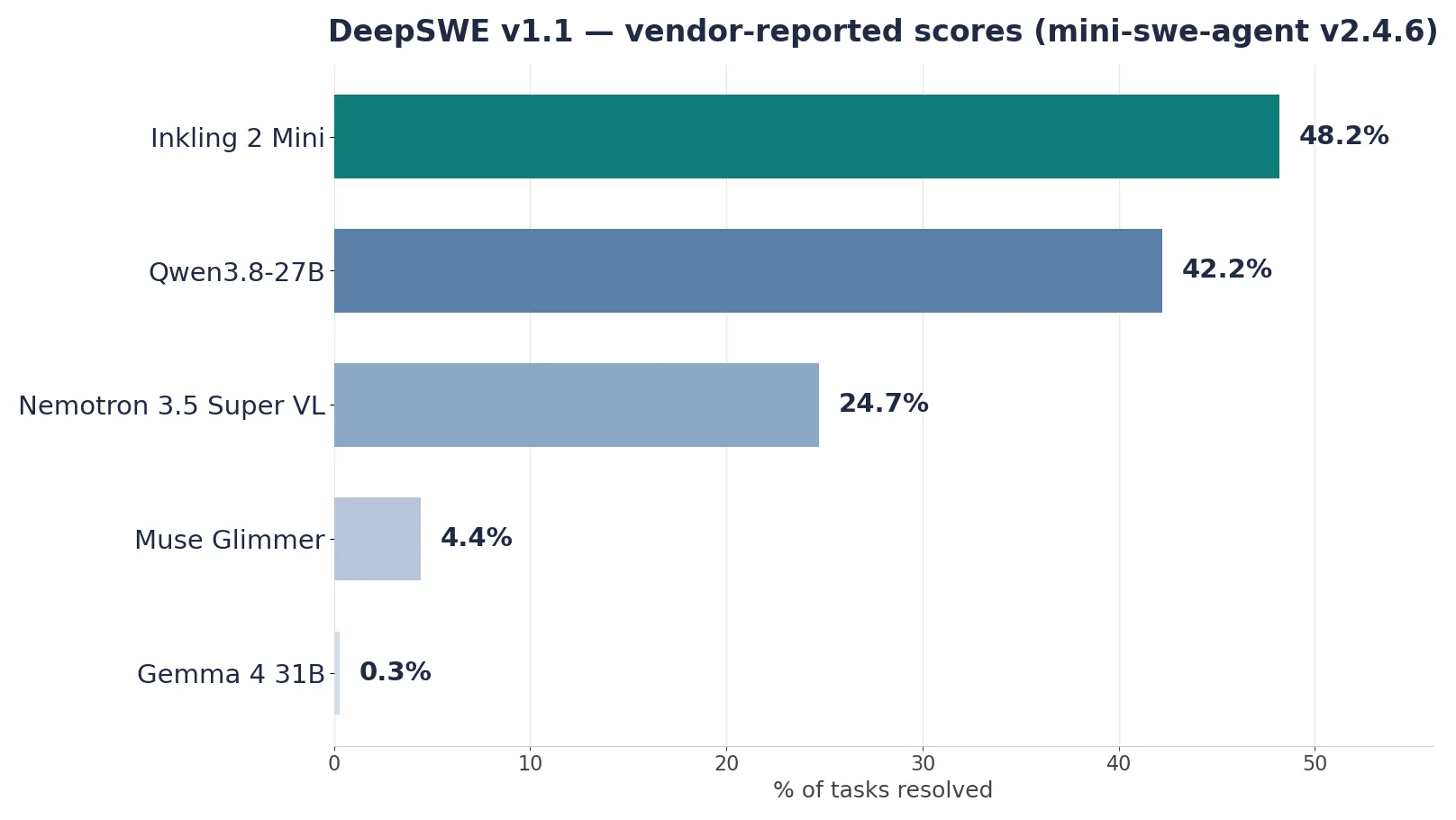
- Vendor-reported coding scores: 48.2% on DeepSWE v1.1, 79.2% on SWE-bench Verified, 82.7% on MCP Atlas — ahead of Qwen3.8-27B on DeepSWE.
- Reasoning effort is a 0.0–0.99 dial (none to max, default high 0.9); set it per runtime via Ollama’s think parameter, the chat-completions body, or the Transformers chat template.
- Apache 2.0 license; text and image inputs, up to 1M tokens of context. The model card warns it can take destructive actions without confirmation — run agents sandboxed, with turn and token caps.

Thinking Machines Lab released Inkling 2 Mini today, November 20, 2026, and it is the first looped transformer you can run on your own hardware. It is a mixture-of-experts model with 26.4 billion total parameters, only 3.4 billion of them active for any given token, a memory footprint of about 20GB, and an Apache 2.0 license. It takes text and image inputs, offers a context window of up to one million tokens, and is built for exactly the work people run locally: agentic coding, tool use, and long-horizon tasks.
The headline numbers are what make it worth an evening of setup. On DeepSWE v1.1, an agentic coding benchmark, Inkling 2 Mini resolves 48.2% of tasks — ahead of every other open-weights model under 100 billion parameters, including Qwen3.8-27B at 42.2%. On SWE-bench Verified it scores 79.2%, on the hard 51-task SWE-bench Pro v2 it scores 77.9%, and on MCP Atlas, a tool-use benchmark, it scores 82.7%. These are the vendor's own reported figures, measured with mini-swe-agent v2.4.6 and the harnesses named in the model card, and evaluation setups vary between models — but the direction is consistent across 32 of the 48 benchmarks the lab reports.
The reason for the scores is the architecture, not the parameter count. Twelve of the model's 24 layers run three times for every token, reusing the same weights. The model does more reasoning per token without writing more reasoning tokens down — which is why it is strong on long agentic traces and weak, relatively, on closed-book factual recall. This tutorial gets it running three ways — Ollama on a Mac, llama.cpp on Linux or Windows, and vLLM on a GPU server — then wires the local endpoint into a small sandboxed coding agent, and shows how to dial its reasoning effort up and down.
What you'll need#
One of the following machines. The 20GB footprint is the hard floor; the 32GB figures are what the runtimes need once context and overhead are included.
| Machine | What runs | Runtime in this tutorial |
|---|---|---|
| Mac with 32GB+ unified memory (MacBook, Mac mini, Studio) | The full model, offline | Ollama (Step 3) or MLX |
| Linux or Windows PC with 32GB+ RAM | The GGUF quantizations | llama.cpp (Step 4) |
| GPU server, 32GB+ VRAM (or a DGX Spark) | The native NVFP4 checkpoint | vLLM or SGLang (Step 6) |
| No suitable hardware | Nothing local — use the hosted API | Tinker (see Step 2) |
Software, per path: Ollama (the preview build on Mac at launch), llama.cpp build b12599 or later, or Docker with the NVIDIA container runtime for vLLM. Python 3.10+ and pytest for the agent in Step 5 — nothing else. No account is needed for any local path. The hosted Tinker path needs a Thinking Machines account and an API key, and is billed: Thinking Machines' first-party pricing is $0.15 per million input tokens, $0.50 per million output tokens, and $0.015 per million cached input tokens, as reported by Artificial Analysis.
How the looping works#
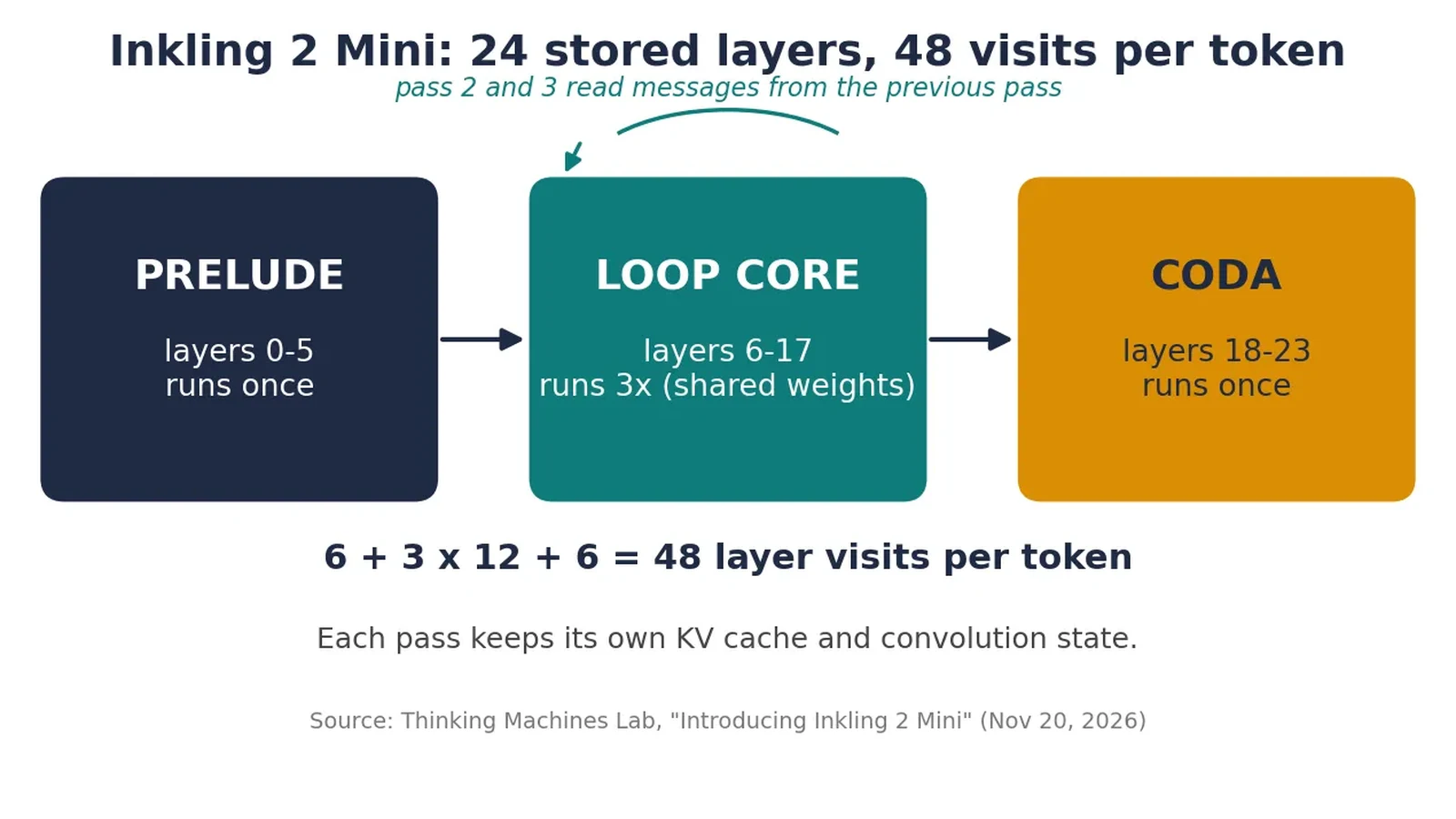
A standard transformer runs each token through its layers once, top to bottom. Inkling 2 Mini splits its 24 layers into four blocks of six. The first block (the prelude, layers 0–5) and the last block (the coda, layers 18–23) each run once. The two middle blocks (layers 6–17) run three times, with the same weights on every pass. That is 6 + 3 × 12 + 6 = 48 layer visits per token, from 24 stored layers.
Every pass starts from the prelude's output — later passes do not simply continue where the previous pass ended. Instead, each layer in passes two and three reads a message from the previous pass's outputs, merged in through a learned gate that starts out blocking the message entirely and opens up during training. Each pass also keeps its own KV cache and convolution state, so the passes do not overwrite each other's memory of earlier tokens.
Two consequences matter in practice. First, looping buys reasoning without parameters: the model behaves like a larger model on multi-step work (the lab's no-chain-of-thought time horizon for the variable-loop research variant rises from 16 seconds at one pass to 37 seconds at three), but its stored knowledge does not grow — knowledge is mostly a function of total parameter count, and on factual benchmarks such as AA-Omniscience it scores in line with other models of its size. Second, looping compresses the chain of thought: the same correct answer takes fewer reasoning tokens at five passes than at one (1,661 vs. 3,703 tokens on average in the lab's GPQA Diamond comparison), while staying legible. The model does more of its thinking inside the loop, where a reader cannot see it — which is why Thinking Machines released the variable-loop research checkpoint alongside it, so researchers can study exactly that trade-off.
Step 1: Check whether your machine can run it#
Before downloading 20GB of weights, confirm the machine clears the bar. On a Mac:
sysctl hw.memsize
# divide by 1,073,741,824 for GB — you want 32 or more
system_profiler SPHardwareDataType | grep Memory
On Linux:
free -h
nvidia-smi --query-gpu=name,memory.total --format=csv  # if you have a GPU
On Windows (PowerShell):
Get-CimInstance Win32_ComputerSystem | Select-Object TotalPhysicalMemory
nvidia-smi --query-gpu=name,memory.total --format=csv  # if you have a GPU
What the numbers mean: the checkpoint itself is about 20GB, and the runtime needs headroom for the context window and the per-pass caches — 48 KV caches instead of 24. Thinking Machines recommends at least 32GB of unified memory on a Mac, and 32GB or more of VRAM on other GPUs. With 16GB, do not try the local path; use Tinker or another hosted endpoint instead. With exactly 32GB, keep the context modest at first (see Step 7) and close other heavy applications before the first load.
Step 2: Pick your runtime#
There is no single right way to run this model — the right runtime depends on the machine you have and what you want to do with it.
| Runtime | Best for | Hardware | What you give up |
|---|---|---|---|
| Ollama | Fastest start on a Mac; chat and coding agents | Mac, 32GB+ unified memory | Mac-only at launch; preview build required |
| llama.cpp (GGUF) | Linux/Windows, CPU or single GPU, full control | 32GB+ RAM | Quantized weights (IQ4_NL or Q8_0), not the native NVFP4 |
| vLLM | Serving a team, long contexts, max throughput | NVIDIA Blackwell/Hopper or DGX Spark | Needs a GPU server and Docker |
| SGLang | GPU serving with speculative decoding | NVIDIA SM103 (Blackwell) and up | More setup than vLLM for a single user |
| Tinker | No hardware; hosted inference and fine-tuning | None (account + API key) | Metered; prompts leave your machine |
| MLX | Mac power users who want the native checkpoint in Python | Apple silicon | Mac-only; command-line workflow |
The rest of this tutorial walks the first three rows in order. If you only want one path, read Step 3 for a Mac, Step 4 for Linux or Windows, and Step 6 for a GPU server — then rejoin at Step 5, which works against any of them, because all three expose an OpenAI-compatible HTTP endpoint.
Step 3: Run it with Ollama on a Mac#
Ollama is the shortest path on a Mac, and at launch it is the path Thinking Machines supports first. One detail matters: Inkling 2 Mini needs Ollama's preview build, not the stable release. Download and open it:
curl -fsSL 'https://ollama.com/download/Ollama.dmg?channel=preview' -o Ollama.dmg
open Ollama.dmg
Then pull the model and start chatting. The first pull downloads roughly 20GB, so do it on a stable connection:
ollama run inkling-2-miniThat command downloads the model if it is not already local, loads it, and drops you into a chat prompt. Try a task that exercises the model's strengths — a small coding job with a verifiable answer, not a trivia question:
>>> Write a Python function that parses a CSV of expenses and returns
... the total per category. Include a test.
Check what you have, and how much memory it is using:
ollama list
ollama ps
For scripts and agents, use the HTTP API that Ollama serves on port 11434. The native chat endpoint takes a think parameter — a boolean, or a level ("low", "medium", "high", "max") — which controls whether the model reasons before answering:
curl http://localhost:11434/api/chat -d '{
  "model": "inkling-2-mini",
  "messages": [{"role": "user", "content": "What is 17 times 24?"}],
  "think": "low",
  "stream": false
}'
The OpenAI-compatible endpoint works the same way, which is what Step 5 uses:
curl http://localhost:11434/v1/chat/completions -H "Content-Type: application/json" -d '{
  "model": "inkling-2-mini",
  "messages": [{"role": "user", "content": "What is 17 times 24?"}]
}'
Two settings worth knowing. First, context: Ollama's default context window is far smaller than the model's 1M-token maximum. For long documents, raise it with the num_ctx option ("options": {"num_ctx": 131072} in the API call), and remember that a bigger context costs memory — the reason the model card recommends 32GB as a floor. Second, keep_alive controls how long the model stays loaded after a request (default five minutes); set "keep_alive": "30m" when an agent will call it repeatedly, so every turn does not pay a reload.
Step 4: Run it with llama.cpp on Linux or Windows#
If you are not on a Mac, llama.cpp is the route. It serves the GGUF quantizations — 4-bit (IQ4_NL) and 8-bit (Q8_0) — published for this release. You need a build with Inkling 2 support: that landed in llama.cpp release b12406 (November 15, 2026), and the current build at time of writing is b12599. Grab the binary bundle for your platform from the llama.cpp releases page and confirm the version:
./llama version
# version: 1.0.0-dev (build 12599, ...)
Then serve the model. The -hf flag downloads the weights straight from Hugging Face — no separate download step:
llama serve -hf ggml-org/Inkling-2-Mini-GGUF:IQ4_NLFor the 8-bit weights, change the suffix to :Q8_0. Two things to know about that flag, both verified against the b12599 build: the default quant is Q4_K_M when you omit it, and not every repository publishes that quant — specifying the quant explicitly, as above, avoids a failed load. The server listens on port 8080 and exposes the same OpenAI-compatible API shape as Ollama:
curl http://127.0.0.1:8080/v1/models
curl http://127.0.0.1:8080/v1/chat/completions -H "Content-Type: application/json" -d '{
  "model": "ggml-org/Inkling-2-Mini-GGUF:IQ4_NL",
  "messages": [{"role": "user", "content": "What is 17 times 24?"}],
  "max_tokens": 512
}'
The same server also serves a chat UI at http://127.0.0.1:8080 in a browser. If you want a vision test, the model takes image inputs — the model card recommends each image dimension be between 40px and 4096px — and the server's /v1/chat/completions endpoint accepts image_url parts, the same shape as the vLLM client in Step 6.
A note on expectations: on a CPU-only machine this is slow. A 0.6B stand-in model served the same way managed about 11 tokens per second on a 4-core virtual machine in our verification, and a 26B model will be slower still. llama.cpp is the right choice for a machine with a good GPU or a lot of patience — for interactive coding work on a laptop, the Mac/Ollama path in Step 3 is the faster one.
Step 5: Build a sandboxed coding agent on the local endpoint#
A model that scores 82.7% on MCP Atlas and 48.2% on DeepSWE is a tool-use model, so the interesting test is not chatting with it — it is letting it call tools. The script below is a minimal coding agent that runs against any OpenAI-compatible local endpoint: Ollama on port 11434, llama.cpp on port 8080, or vLLM on port 8000. It has three tools (write_file, read_file, run_tests), three guardrails, and no dependencies beyond the standard library.
The guardrails are not optional decoration. The model card warns that Inkling 2 Mini can take destructive actions, such as deleting or overwriting files, without confirmation, and may not report the outcome of its work accurately; it also sometimes gets stuck in long reasoning loops when debugging. So the agent confines every file write to one sandbox directory, allows exactly one shell command (python -m pytest), and caps both the number of turns and the tokens per call:
#!/usr/bin/env python3
"""Minimal sandboxed coding agent against an OpenAI-compatible local endpoint.

Task: write calc.py (add/subtract/multiply) plus a pytest file, run the tests,
fix failures. Guards: files may only live inside WORKDIR; the only shell
command the agent can run is `python -m pytest`; at most MAX_TURNS turns;
each model call is capped at MAX_TOKENS output tokens.

Stdlib only. Point it at any OpenAI-compatible server:
  OLLAMA_URL=http://localhost:11434/v1 OLLAMA_MODEL=inkling-2-mini python3 agent.py
"""
import json
import os
import subprocess
import sys
import urllib.request

BASE_URL = os.environ.get("OLLAMA_URL", "http://localhost:11434/v1")
MODEL = os.environ.get("OLLAMA_MODEL", "inkling-2-mini")
WORKDIR = os.environ.get("AGENT_WORKDIR", os.path.join(os.path.dirname(__file__), "sandbox"))
MAX_TURNS = int(os.environ.get("MAX_TURNS", "8"))
MAX_TOKENS = int(os.environ.get("MAX_TOKENS", "1024"))

SYSTEM = (
    "You are a careful coding agent working inside a sandbox directory. "
    "Use the tools to write calc.py with add(a, b), subtract(a, b) and "
    "multiply(a, b), write test_calc.py with pytest tests for all three, "
    "run the tests, and fix any failures. Do not create files outside the "
    "sandbox. When the tests pass, reply with a short summary and stop."
)

TOOLS = [
    {"type": "function", "function": {
        "name": "write_file",
        "description": "Write content to a file inside the sandbox.",
        "parameters": {"type": "object", "properties": {
            "path": {"type": "string", "description": "Relative path, e.g. calc.py"},
            "content": {"type": "string"}},
            "required": ["path", "content"]}}},
    {"type": "function", "function": {
        "name": "read_file",
        "description": "Read a file inside the sandbox.",
        "parameters": {"type": "object", "properties": {
            "path": {"type": "string"}},
            "required": ["path"]}}},
    {"type": "function", "function": {
        "name": "run_tests",
        "description": "Run `python -m pytest -q` in the sandbox and return the output.",
        "parameters": {"type": "object", "properties": {}}}},
]


def _safe_path(rel):
    full = os.path.realpath(os.path.join(WORKDIR, rel))
    if os.path.commonpath([full, os.path.realpath(WORKDIR)]) != os.path.realpath(WORKDIR):
        raise ValueError(f"path escapes sandbox: {rel}")
    return full


def run_tool(name, args):
    if name == "write_file":
        p = _safe_path(args["path"])
        os.makedirs(os.path.dirname(p) or WORKDIR, exist_ok=True)
        with open(p, "w") as f:
            f.write(args["content"])
        return f"wrote {args['path']} ({len(args['content'])} bytes)"
    if name == "read_file":
        with open(_safe_path(args["path"])) as f:
            return f.read()
    if name == "run_tests":
        r = subprocess.run([sys.executable, "-m", "pytest", "-q"],
                           cwd=WORKDIR, capture_output=True, text=True, timeout=120)
        return (r.stdout + r.stderr)[-2000:]
    raise ValueError(f"unknown tool {name}")


def chat(messages):
    body = json.dumps({"model": MODEL, "messages": messages, "tools": TOOLS,
                       "max_tokens": MAX_TOKENS}).encode()
    req = urllib.request.Request(BASE_URL + "/chat/completions", data=body,
                                 headers={"Content-Type": "application/json"})
    with urllib.request.urlopen(req, timeout=600) as resp:
        return json.load(resp)


def main():
    os.makedirs(WORKDIR, exist_ok=True)
    messages = [{"role": "system", "content": SYSTEM},
                {"role": "user", "content": "Build calc.py and its tests, then make the tests pass."}]
    for turn in range(1, MAX_TURNS + 1):
        data = chat(messages)
        msg = data["choices"][0]["message"]
        print(f"--- turn {turn} ---")
        print("assistant:", (msg.get("content") or "")[:300])
        calls = msg.get("tool_calls") or []
        if not calls:
            print("no tool calls; done.")
            break
        messages.append(msg)
        for call in calls:
            fn = call["function"]["name"]
            args = json.loads(call["function"]["arguments"] or "{}")
            print(f"tool: {fn} {args if fn != 'write_file' else args['path']}")
            try:
                result = run_tool(fn, args)
            except Exception as e:  # noqa: BLE001 - surface tool errors to the model
                result = f"ERROR: {e}"
            print("result:", result[:300])
            messages.append({"role": "tool", "tool_call_id": call["id"],
                             "content": result})
    else:
        print(f"stopped: hit MAX_TURNS={MAX_TURNS}")


if __name__ == "__main__":
    main()
Run it against the Ollama endpoint from Step 3, or point it at llama.cpp on port 8080:
OLLAMA_URL=http://localhost:11434/v1 OLLAMA_MODEL=inkling-2-mini python3 agent.py
# llama.cpp instead:
OLLAMA_URL=http://127.0.0.1:8080/v1 OLLAMA_MODEL="ggml-org/Inkling-2-Mini-GGUF:IQ4_NL" python3 agent.py
What to expect: the agent writes calc.py, writes test_calc.py, runs pytest, fixes any failure, and stops with a summary. In verification, the loop ran end to end against a scripted mock of the endpoint — four turns, ending with 3 passed — which proves the client, the tool schemas, and the sandbox. Against a real 0.6B stand-in model served locally, the same script got an empty reply with no tool calls: the loop works, the tiny model does not. Two practical notes follow from that. First, keep MAX_TOKENS generous: thinking models spend part of every call's budget on reasoning, and the stand-in given 256 tokens spent the whole budget thinking. Second, the model card's warning about destructive actions is real — this script's sandbox is the whole safety story, so do not widen the toolset (no shell, no network, no paths outside the sandbox) until you have watched the agent behave on harmless tasks.
Step 6: Serve it on a GPU with vLLM#
For a GPU server — a team sharing one model, or a long-context workload — vLLM is the supported path, with day-zero support for Inkling 2 Mini on NVIDIA Blackwell, Hopper, and DGX Spark hardware. Support is not in a vLLM release yet, so use the dedicated image, vllm/vllm-openai:inkling-2-mini:
docker run --gpus all --ipc=host -p 8000:8000 \
  -v ~/.cache/huggingface:/root/.cache/huggingface \
  vllm/vllm-openai:inkling-2-mini thinkingmachines/Inkling-2-Mini \
  --reasoning-parser inkling --tool-call-parser inkling --enable-auto-tool-choice \
  --speculative-config '{"method":"dspark","num_speculative_tokens":7,"draft_sample_method":"probabilistic"}'
What the flags do: --reasoning-parser inkling and --tool-call-parser inkling teach the server the model's own reasoning and tool-call format; --enable-auto-tool-choice lets the model decide when to call a tool; the speculative config enables the DSpark draft model bundled in the checkpoint, which proposes tokens for the target model to verify. The draft reads hidden states from inside the loop itself, so it stays aligned with the looped computation.
The client is the standard OpenAI SDK against port 8000. This snippet is from vLLM's own recipe, including an image input:
from openai import OpenAI

client = OpenAI(api_key="not-needed", base_url="http://localhost:8000/v1")
response = client.chat.completions.create(
    model="thinkingmachines/Inkling-2-Mini",
    messages=[{
        "role": "user",
        "content": [
            {"type": "text", "text": "Describe this image."},
            {"type": "image_url", "image_url": {"url": "https://example.com/photo.jpg"}},
        ],
    }],
)
print(response.choices[0].message.content)
Context limits depend on the GPU. On one GB200 the recipe serves the full 1,048,576-token context; on H100 and DGX Spark it caps context at 262,144 tokens to fit in memory. The same cap applies to concurrent long sessions: with 32K, 64K, and 128K-token sessions, roughly 45, 32, and 20 sessions run at 100 tokens per second per user on one GPU. If you are experimenting with the loop itself rather than serving the fixed model, the variable-loop research checkpoint takes the same command with thinkingmachines/TML-d24-varloop-research and an --hf-overrides flag that sets loop_num_passes (fewer passes run faster; more passes score higher) — vLLM's own measurements show a single-token decode step on one GB200 rising from 1.51ms at one pass to 3.85ms at three.
SGLang is the equivalent server path, with day-zero support and a slightly different command shape. It needs SM103 hardware, and the model path, served name, and backends are explicit:
export MODEL="thinkingmachines/Inkling-2-Mini"
python -m sglang.launch_server \
  --model-path $MODEL \
  --served-model-name inkling \
  --attention-backend fa4 --bf16-gemm-backend torch --dtype bfloat16 \
  --tp 1 --page-size 128 --grammar-backend xgrammar \
  --host 0.0.0.0 --port 30000
Check it with curl -s localhost:30000/health_generate, then call it like any OpenAI-compatible endpoint — with the served name inkling as the model, and "reasoning_effort": "low" in the request body when you want a quick answer.
Step 7: Dial the reasoning effort up and down#
Every Inkling model shares one reasoning-effort interface, and it is the most useful knob on this model. Effort is a number from 0.0 to 0.99, with named levels:
| Level | Value | Use it for |
|---|---|---|
none | 0.0 | Direct answers; but note the minimum does not fully disable reasoning — the middle layers still loop three times |
minimal | 0.1 | Trivia, formatting, quick lookups |
low | 0.2 | Short coding questions, single-file edits |
medium | 0.7 | Everyday coding and research |
high | 0.9 (default) | Hard debugging, multi-file refactors |
xhigh / max | 0.99 | The longest agentic traces; slowest, most expensive per token |
Where you set it depends on the runtime. In Hugging Face Transformers, pass it to the chat template — processor.apply_chat_template(messages, reasoning_effort="medium", ...) — and the template adds the numeric value to the prompt as a system message. The same call also drives tool calling: pass tools=[your_function] and the model returns parsed tool calls via processor.parse_response. With SGLang or vLLM, put "reasoning_effort": "low" in the chat-completions JSON body. With Ollama, use the think parameter from Step 3 ("low", "medium", "high", or "max").
The practical rule: start at medium for coding work and drop to low when the answers are good but slow. Do not expect effort to fix factual gaps — the lab's own measurements show closed-book factual QA barely moves with more passes, while multi-hop reasoning and long-context retrieval improve. And keep the monitorability caveat in mind: higher effort means shorter, denser reasoning traces, not necessarily more transparent ones.
Which approach should you use?#
If you have a 32GB+ Mac and want to code tonight, use Ollama — it is the only path Thinking Machines supports at launch, and the preview build is a two-command install. If you are on Linux or Windows, use llama.cpp with the IQ4_NL quant and accept the speed trade-off, or the Q8_0 quant if you have the disk space and RAM to spare. If you are serving a team or feeding the model hundred-thousand-token contexts, use vLLM on a GPU server, where the full 1M context is real and the DSpark draft makes it fast. If you have no suitable hardware at all, use Tinker: the same model, metered, with fine-tuning available when you outgrow prompting. And if you are a researcher, skip the fixed model and run the variable-loop checkpoint — it is the only artifact that lets you change the number of passes and watch the reasoning compress.
One thing none of these paths change: this is a small model that punches above its size on agentic work and stays a small model on factual recall. Pair it with search and tools — the benchmarks where it leads, BrowseComp (79.0%) and DeepSearchQA (85.3%), are the ones where it can look things up — and do not ask it to recite facts from memory.
The takeaway#
Inkling 2 Mini is the most capable open-weights model you can actually run on a laptop today: 26.4 billion parameters, 5.4 billion active per token once looping is counted, a 20GB footprint, and coding scores ahead of Qwen3.8-27B. The loop is the whole idea — twelve layers, three passes, forty-eight visits per token — and it is what makes the model good at the multi-step work local agents do, while leaving its factual knowledge at the level of any model its size.
To run it: check for 32GB of memory, pick the runtime that matches your machine, and start with Ollama on a Mac or llama.cpp elsewhere. Keep the agent sandboxed, cap its turns and tokens, and let the model call tools — that is where it earns its keep. Then tune the reasoning effort to the task, and remember that the cheapest way to make this model smarter is to give it tools and a search box, not a longer thinking budget.
How this was verified: the Ollama, vLLM, SGLang, and Tinker commands in this tutorial are quoted from the official Ollama library page, vLLM's recipe and launch blog, Hugging Face's release post, and Thinking Machines' cookbook, all read on November 20, 2026. The llama serve -hf form was confirmed against llama.cpp build b12599, whose --help lists the -hf flag. The agent script ran end to end against a scripted mock of the OpenAI-compatible endpoint (four turns, three tests passing) and against a real local llama.cpp server running a 0.6B stand-in model, which returned an empty reply and no tool calls. The 20GB model itself was not run on the author's machine — it needs a 32GB Mac — so the Inkling-specific behavior in this tutorial is documented from the official sources, not from a local run of the weights.
Sources#
- Thinking Machines Lab — Introducing Inkling 2 Mini — the announcement: architecture, benchmarks, limitations, and the Mac/Ollama launch support.
- Thinking Machines Lab — Inkling-2-Mini model card (Hugging Face) — parameters, hardware requirements, supported frameworks, and the safety and limitations section.
- Hugging Face — Welcome Inkling 2 Mini, Cutting-edge Performance for your Local Setup — the Transformers, llama.cpp, SGLang, and MLX quickstarts, reasoning-effort levels, and tool-calling example.
- Ollama — inkling-2-mini — the model listing, the
ollama run inkling-2-minicommand, and the preview-build install. - Ollama — API documentation — the
thinkparameter and thenum_ctx/keep_aliveoptions. - vLLM — Inkling-2-Mini recipe — the Docker image, context caps per GPU, and the OpenAI client example.
- vLLM — Inkling 2 Mini on vLLM: Day-0 Support for a Looped Model — the full Docker serve command, the variable-loop variant, and per-pass decode timings.
- Thinking Machines Lab — Tinker Cookbook (GitHub) — Tinker signup, API key setup, and the
thinkingmachines/Inkling-2-Minimodel name. - Artificial Analysis — Thinking Machines has released Inkling 2 Mini — the independent Intelligence Index score (20) and Tinker's first-party pricing.