Write HTML, get MP4: hands-on with HyperFrames, the 54K-star video framework built for agents
You already know how to make motion graphics — you just call them web pages. HyperFrames takes HTML, CSS and a seekable GSAP timeline, scrubs it deterministically in headless Chromium, and muxes the frames into an MP4. It is sitting at 54,000 stars because video generation moved from model outputs to code outputs, and this one ships skills that let coding agents author video the way they author software.

The most interesting open-source AI project trending on GitHub today is not a model. It is a video renderer with 54,429 stars, 4,949 forks and nearly five thousand commits since March 2026 — and its tagline is "Write HTML. Render video. Built for agents." HyperFrames, from the HeyGen team, treats a video as a deterministic artifact of code: you write a web page, describe its motion as a seekable GSAP timeline, and the framework scrubs that timeline frame by frame in headless Chromium and muxes the result into an MP4. Same input, same output, every time. And the "built for agents" part is literal — it ships skills and CLI workflows that let coding agents author, check and render video the way they write software: as files in a repo.
I spent an afternoon verifying every claim below on a stock Linux machine — Node, FFmpeg, no GPU, no accounts. What follows is the full loop: scaffold, the stock template's failure, the fix, a three-scene product intro composed by hand, the check gate, the render, and the agent-skills layer. Everything shown ran.
Why this is blowing up now
Video generation has quietly split into two worlds. On one side, diffusion models produce photorealistic footage from prompts — gorgeous, stochastic, unversionable. On the other, motion graphics for explainers, product launches, charts, kinetic type and data stories need the opposite properties: exact layout, exact timing, reproducibility, and the ability to diff a change in git. That second world used to belong to After Effects and Remotion; HyperFrames is winning it on GitHub because it is deterministic HTML-to-video plus an agent-native authoring surface, and it is open source under Apache-2.0.
The agent angle is the real growth story. A diffusion video call returns frames an agent cannot inspect as code. A HyperFrames project is a directory of HTML files with data attributes — data-start, data-duration, data-composition-id — and a paused GSAP timeline. An agent can read it, edit it, run npm run check to validate it, and re-render. Twenty-one published skills route every intent — explainer video, product launch, music video, captions on existing footage — through a dedicated workflow, and a /hyperframes router picks the right one for the brief. Video becomes a software artifact with lint, CI and code review.
What HyperFrames actually does
The pipeline is refreshingly mechanical:
- You write a composition: an HTML file whose root element carries
data-composition-id,data-durationand dimensions, with timed scenes marked bydata-start/data-duration. - Motion is a paused GSAP timeline registered last on
window.__timelines[id]. Paused matters: the renderer seeks the timeline to each frame time and screenshots — it never plays the video in real time. npm run checkvalidates everything — lint, runtime behavior in a headless page, layout seek-safety, motion sanity, and even WCAG text contrast — and refuses to render broken motion.npm run rendercaptures every frame in headless Chromium, then muxes frames plus audio with FFmpeg into an MP4.
Determinism is a design contract, not a hope: no Date.now(), no unseeded Math.random(), no render-time network fetches for visual state, no infinite repeats — and the checker enforces the key parts. This is what makes re-renders byte-stable and diffs meaningful.
What you will need
Node 22 or newer, FFmpeg on your PATH, and a machine with some disk — no GPU, no API keys, no accounts. I ran everything on Node v24.20.0 with FFmpeg 8.1.2. First-time setup downloads a headless Chromium build, so budget a few quiet minutes. Run npx hyperframes doctor at any point: it reports which optional extras are missing (local TTS and music-generation models, Docker) without blocking the core path.
Step 1 — Scaffold and meet the check gate
npx hyperframes init hello-hf
cd hello-hf
npm run check
The init took about four minutes on my machine (Puppeteer/Chromium download included) and produced a template project with index.html, an assets/ tree, and npm scripts pinning the exact CLI version so the project re-renders identically months later. Then I ran npm run check on the untouched template, expecting a green baseline. I got this instead:
x page_error: gsap is not defined
x Timeline did not advance under seek
+ Check failed
The template loads GSAP from the jsdelivr CDN, and the CDN request failed in my environment — so the example script never ran and the timeline never advanced. This is not a bug in the project: it is the check gate doing its job. HyperFrames will not let you render a page whose motion is broken. But it taught me the first rule of shipping HyperFrames work, the hard way: CDN scripts are a render-failure risk. Deterministic video cannot depend on a network fetch at render time. So the fix is to vendor animation libraries locally.
Step 2 — Vendor your libraries, kill the CDN
cd hello-hf
npm pack [email protected]
tar -xzf gsap-3.14.2.tgz package/dist/gsap.min.js -O > assets/js/gsap.min.js
That gives you a 72 KB local gsap.min.js. Swap the template's CDN <script> tag for <script src="assets/js/gsap.min.js"> and the page — and the render — becomes fully offline-safe. I recommend vendoring this way rather than copying from node_modules, because it pins the exact version your timeline was authored against.
Step 3 — Compose a three-scene product intro
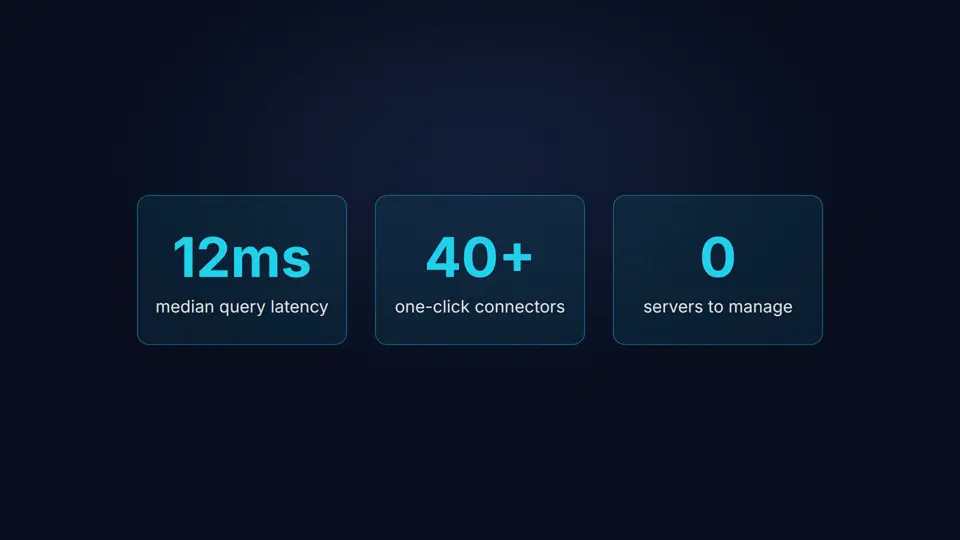
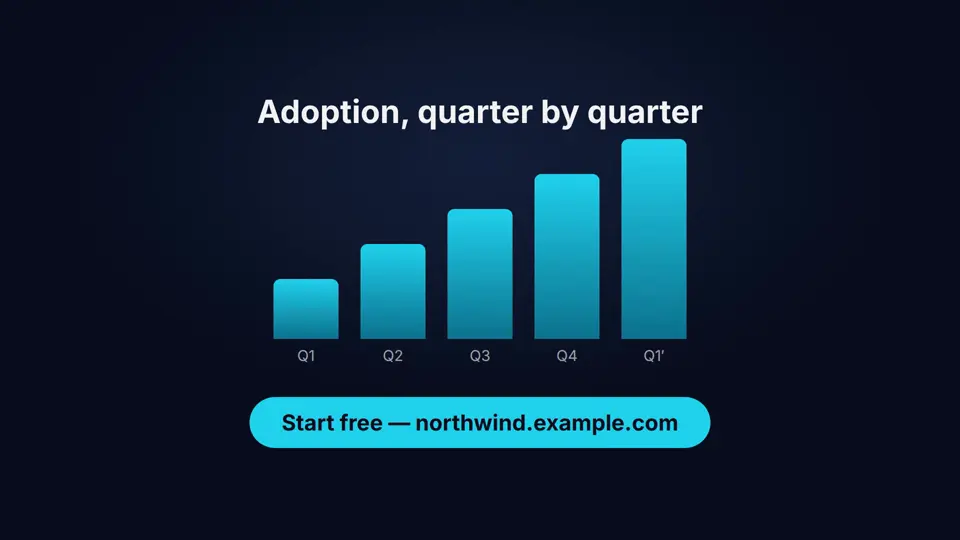
I replaced the template page with a 10-second product intro for a fictional analytics product: a kinetic title (0–3.4 s), three staggered stat cards (3.4–6.8 s), then an animated bar chart with an end-card call to action (6.8–10 s). The whole thing is one HTML file. The structure:
<div id="root"
     data-composition-id="main"
     data-start="0" data-duration="10"
     data-width="1920" data-height="1080">

  <section id="scene1" class="clip"
           data-start="0" data-duration="3.4" data-track-index="0">
    ...kicker, title, subtitle...
  </section>

  <section id="scene2" class="clip"
           data-start="3.4" data-duration="3.4" data-track-index="0">
    ...three .card.stat elements...
  </section>

  <section id="scene3" class="clip"
           data-start="6.8" data-duration="3.2" data-track-index="0">
    ...bars, labels, CTA pill...
  </section>
</div>
Every timed element gets data-start and a duration — that is what makes it timed. data-track-index is just a Studio display lane; the render ignores it. And the motion, one paused timeline, tweens registered in order, registered last:
const tl = gsap.timeline({ paused: true });

tl.from("#s1-kicker", { opacity: 0, y: 30, duration: 0.6, ease: "power3.out" }, 0.2);
tl.from("#s1-title",  { opacity: 0, y: 70, duration: 0.8, ease: "power3.out" }, 0.45);
tl.from("#s1-sub",    { opacity: 0, y: 40, duration: 0.7, ease: "power3.out" }, 0.9);
tl.to("#scene1-inner", { opacity: 0, duration: 0.4, ease: "power1.in" }, 3.0);

tl.from(".stat", { opacity: 0, y: 80, duration: 0.7, stagger: 0.18, ease: "power3.out" }, 3.7);
tl.to("#scene2-inner", { opacity: 0, duration: 0.4, ease: "power1.in" }, 6.4);

tl.from(".bar", { scaleY: 0, duration: 0.6, stagger: 0.12, ease: "power3.out" }, 7.0);
tl.from("#s3-title", { opacity: 0, y: 30, duration: 0.6, ease: "power3.out" }, 6.9);
tl.from("#s3-cta", { opacity: 0, y: 40, duration: 0.7, ease: "back.out(1.4)" }, 8.3);

// Register LAST, after all tweens exist.
// The runtime creates window.__timelines — do not initialize it yourself.
window.__timelines["main"] = tl;
Four rules I learned from the skill docs and the checker's complaints:
- Never
tl.play(). A playing timeline cannot be seeked deterministically; the runtime seeks the paused timeline itself. Scene timelines manually added to a root must not be paused either — a paused child does not advance when the root is seeked. - Never tween the
.clipelement itself. HyperFrames owns clip visibility; tween a child wrapper (my#scene1-innerexit fades) and let the framework show and hide scenes. - No non-deterministic expressions.
Date.now(),performance.now(), unseededMath.random(), and render-time network fetches for visual state are all banned — the same composition must produce the same frames on any machine. - Register the timeline last, after every tween exists, on the composition id.
Step 4 — Audio without silent renders
Music and voiceover attach as <audio> elements with data-start and data-duration (the duration can default to the media length), or <video muted playsinline> with a separate audio element. I synthesized a 10-second ambient pad with FFmpeg as a placeholder bed — explicit placeholder, not production music:
ffmpeg -f lavfi -i "sine=frequency=220:duration=10" \
       -f lavfi -i "sine=frequency=277.18:duration=10" \
       -f lavfi -i "sine=frequency=329.63:duration=10" \
       -filter_complex "[0][1][2]amix=inputs=3,volume=0.12,afade=t=in:st=0:d=1.5,afade=t=out:st=8.5:d=1.5" \
       assets/audio/pad.mp3
Then the element. This is where npm run check earned its keep a second time:
<audio id="music-bed" src="assets/audio/pad.mp3"
       data-start="0" data-duration="10" data-track-index="5"></audio>
My first draft had no id on the audio element. The checker failed with media_missing_id: the renderer requires the id to discover media elements — this audio will be SILENT in renders. One attribute, and your music bed silently vanishes from the MP4. The framework even ships optional local TTS (Kokoro) and music generation (MusicGen) models as doctor extras — I skipped them here, but they close the loop for narrated explainers without leaving the machine.
Step 5 — Check green, then render
After the audio fix:
0 error(s), 3 warning(s), 0 info(s)
Runtime    + 0 errors, 0 warnings
Layout     + 0 issues across 9 sample(s)
Motion     + 0 errors, 0 warnings
Contrast   + 24/24 text checks pass WCAG AA
+ Check passed
The three warnings are Studio display nits (it prefers each scene in its own sub-composition file) — safe to ship against. Then the render:
npm run render1.3 MB - 10.0s video - rendered in 1m 39.2s
screenshot capture - software gpu - compile 9.8s
capture 1m 21.1s - assemble 3.4sTen seconds of 1080p rendered in 99 seconds on two CPU cores — roughly ten times faster than real time, with no GPU involved. The output: exactly 10.0 s, 1920×1080, H.264 plus an AAC audio stream. I verified the audio was not just present but audible — the pad bed measured a mean level of −36.2 dB, right where a background bed should sit. And I pulled frames at t=1, t=5 and t=9 to confirm each scene rendered correctly at its seek position (the stat-card and chart frames in this article are those exact captures).
One environment gotcha worth knowing: the render stages temporary files in /tmp, and a full 512 MB /tmp filesystem fails the render with "Low disk space". Redirect with TMPDIR=/path/with/room npm run render. On a normal workstation you will never notice; in a container, you might.
Step 6 — The agent layer: skills, not prompts
The part that explains the star count. HyperFrames does not expect you to prompt a model and hope; it installs skills — markdown playbooks with tool wiring — into your agent's skill directory:
npx hyperframes skills updateInstalled/updated 11 skill(s): general-video, hyperframes,
hyperframes-animation, hyperframes-audio, hyperframes-cli,
hyperframes-core, hyperframes-creative, hyperframes-keyframes,
hyperframes-registry, hyperframes-studio, media-useEach skill encodes the framework-specific patterns that are not in generic web documentation — the window.__timelines registration contract, the data-attribute semantics, the determinism rules, seek-safe CSS. A /hyperframes router skill confirms the brief first, then routes "make me a product launch video" to /product-launch-video, a PR link to /pr-to-video, a talking-head MP4 to /embedded-captions, and so on. There are published skills for Claude Code and Codex, and the project template ships an AGENTS.md telling agents to load the skills before writing any composition — because skipping them produces broken compositions, as I can attest.
The consequence: "make the stat cards stagger faster" becomes a file edit, a check, and a re-render — a diff your reviewer can read, not a seed you pray reproduces. That is the workflow the 54K stars are actually voting for.
When to use this — and when not to
- HyperFrames — Use it when the motion is code: kinetic type, charts and data stories, logo stings, product-UI walkthroughs, captioned explainers. Deterministic, diffable, agent-authorable, free, offline. The price is a ceiling on visual style — you get the web, not a film set.
- Remotion — The closest cousin: React components to video, also code-driven. Reach for it when your motion design lives in React and you want the ecosystem (transitions, captions, server-side rendering). HyperFrames wins when you want framework-agnostic HTML/CSS or the agent-skill workflow; Remotion wins for React-native teams.
- Manim — Still the king of mathematical animation (its output is unmistakable). Use it for math/physics explainers; HyperFrames cannot touch its programmatic precision for equations.
- Diffusion video generators — Use them when you need photorealistic or impossible footage: a drone shot that was never filmed, a product in a scene that does not exist. Stochastic, expensive, unversionable — the complement to HyperFrames, not the competitor. My rule: footage from models, motion graphics from code.
- Hand-rolled FFmpeg filter graphs — Still fine for overlays, cuts and concat jobs. Graduate to HyperFrames when the timeline gets complex enough that you want scenes, easing and typography instead of filter syntax.
Takeaway
The honest surprise of this tutorial was not that HyperFrames works — it is that its strictness is the feature. The stock template failed its own check on a dead CDN link; the checker caught a missing id that would have shipped a silent render; the renderer refused to emit broken motion. Every one of those stops cost me minutes and saved me from publishing a broken video. Deterministic video demands a deterministic toolchain, and this one enforces it.
If you make explainers, launch videos, data stories or anything where the motion should be reviewable in a pull request, the loop is worth memorizing: scaffold, vendor your libraries, compose timed scenes around one paused GSAP timeline, keep an id on every media element, npm run check until green, npm run render, and verify the frames. Agents get the same loop through the installed skills — which is why, I suspect, this repository has fifty-four thousand stars and a commit history moving at a thousand commits a month.